
Test Call Hammer Report
Besides the actual test, you receive a test call “hammer” report of the calls made. Below is a typical report.

Options
Recorded audio as a wav
The PCAP of the call
Explanations
Most fields are obvious. We will explain the others
CID : The caller ID we sent you. It’s always 804-222-1111 and the caller ID name should say TESTCALL.COM. This helps you find the calls in your SMDR.
Disc Code : The SIP disconnection code. We are locking for a 200 code to know the call terminated normally.
Disc Status : Verbal form of 200.
Who Hung Up : Should be caller. We typical hang on for as long as your audio file plays and let you hang up.
MOS : This is the MOS value through our PSTN switch to you.
RTP Packets-Rec : How many audio packets we collected on the test. This should match you end if you are performing a “wireshark”
RTP Packets- Lost : Should be zero. This is a test QC measure.
Non silent % : A simple way to prove we heard your audio file. You could record a target file and edit half of the audio to zero. The value would then be 50%.
Audio File Name : It does not really say “on file”. This field has a value we use to find the file for you.
PCAP : Likewise, we can return the entire SIP trace to you. Understand this is a trace from us to our PSTN switch used to call you via PSTN. It would be the same as any caller would experience. In some cases, you may want a direct IP call to you bypassing the PSTN. Talks to us about that as it’s more complex.
Test Call Monitor Report
You are provided a URL to run these report on your own at any time. These reports are real time.
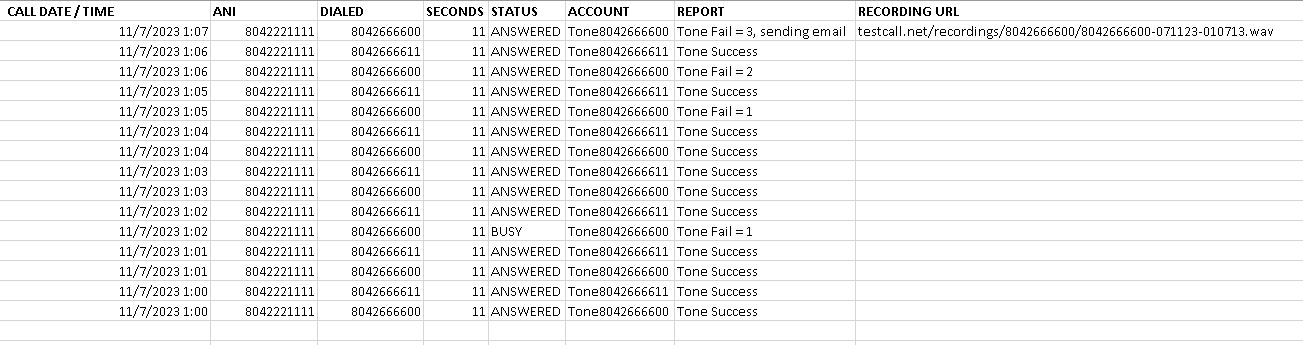
ANI : The caller ID we sent you. It’s always 804-222-1111 and the caller ID name should say TESTCALL.COM. This helps you find the calls in your SMDR.
DIALED : Your target PBX to be monitored once a minute.
REPORT : Did we hear a tone or not. And it’s three strikes, your emailed. So, while we call every minute, you do not get notified for 3 calls (3 minutes).
RECORDING URL : We provide a recording of the failed call for you to hear. (in beta)
Separate from this report, you are notified by email upon 3 failures, 4 failures and 5 failures to detect a 1004hz tone. Continued failures don’t email you. A tone success resets the fail counter to zero.